
“Light” applications are everywhere, as long as a place has humans, there will be a need for light. According to different fields of spectrometer users, UPRTEK had released the uSPECTRUM PC Software for larger screens and create more convenient viewing environment, which allows users to control the MK350 devices with USB connection for multiple measurements comparing, sorting and analyzing data. uSPECTRM is not only provides existing functions of MK350 devices, but also provides .dll libraries for users wishing to custom program for MK350 devices.
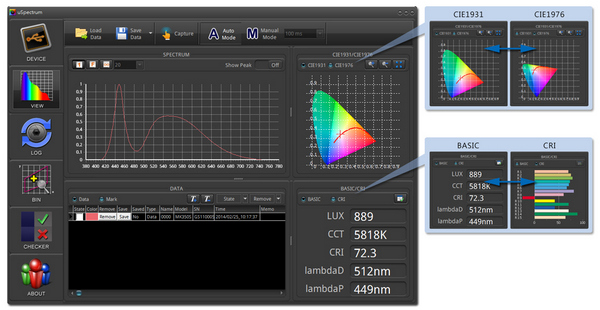 |
| uSPECTRUM PC Software for light analysis. (LEDinside/UPRtek) |
VIEW Mode
Multiple measurement compare: Spectrum/CIE1931/CIE1976/CRI/Raw Data.
LOG Mode
It automatically captures and logs light measurement at 3 kinds of setting, provides the results on trend charts to easier the long time monitor.
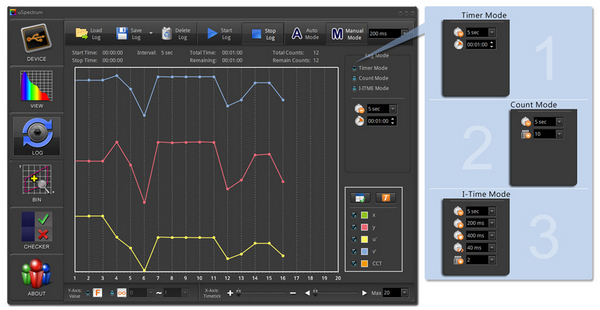 |
| uSPECTRUM PC Software log mode. (LEDinside/UPRtek) |
BIN Mode
MK350S BIN chart default setting is ANSI C78.377
Through uSPECTRUM BIN mode to Add/Revise/Custom MK350S BIN chart by your own.
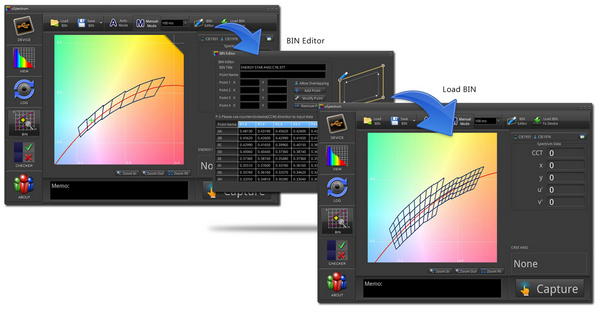 |
| uSPECTRUM PC Software bin mode. (LEDinside/UPRtek) |
CHECKER Mode
Use uSPECTRUM controls the quality via PC, convenient for mass production operations.
PC software free to download (Read MK350 data only, no license requirement)
http://www.uprtek.com/english/products_detail.asp?pid=162
Experience uSPECTRUM controls MK350 to captures and analysis, please go to below link check where to buy the optional accessory:
http://www.uprtek.com/english/ContactUs_03.asp
Or email to sales@uprtek.com, we will reply to you as soon as possible.